Prompts
Prompts are used to analyze graphs, aggregate data, and write summaries in templates.
info
There are two types of prompts: default and custom. Default prompts are taken from the system and cannot be edited, but you can create a custom prompt based on them to suit your needs.
You can submit your ideas for improving the default prompts in our Git repository.
How to add Custom Prompts
- First, open the "Prompts" tab.
- Then click on "Add custom prompt".
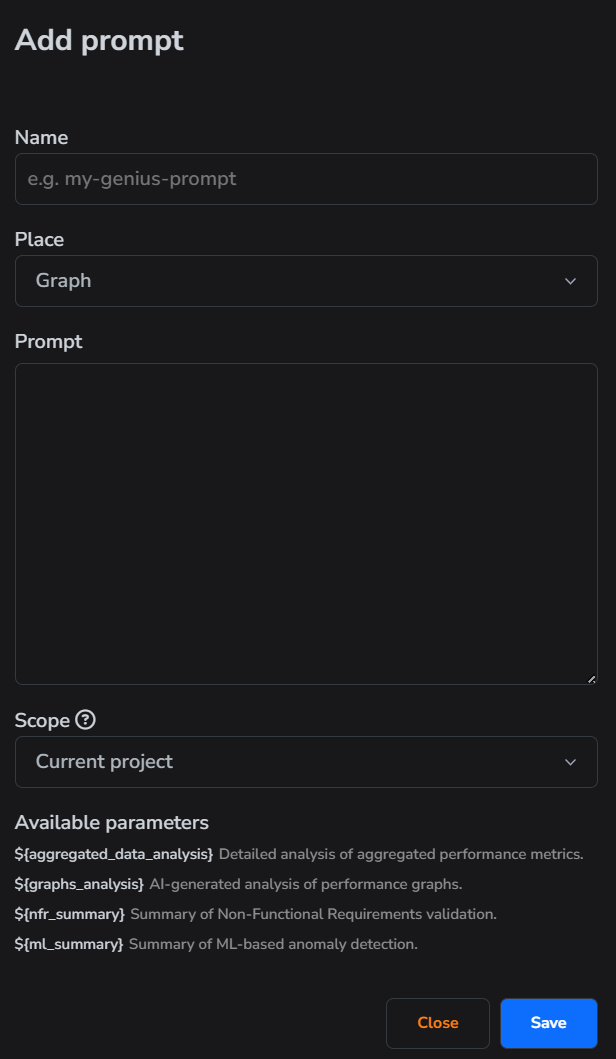
- Fill in all necessary fields.
- Click "Save" button.
info
A prompt place is used to indicate where the given prompt will be utilized.
info
Under "Available Parameters," you'll find a list of placeholders that will be replaced with actual values before being sent to the LLM.