Uploading results to InfluxDB
This guide explains how to upload performance test results to InfluxDB for analysis and reporting with PerForge.
Prerequisites
Before uploading results, ensure you have:
- InfluxDB v2 instance running and accessible.
- Proper InfluxDB configuration set up in PerForge (see Integrations).
- Performance test results in the expected format.
Supported Backend Listeners
PerForge supports the following backend listeners for uploading data to InfluxDB:
org.apache.jmeter.visualizers.backend.influxdb.InfluxdbBackendListenerClientfor JMeter tests.
Uploading Steps
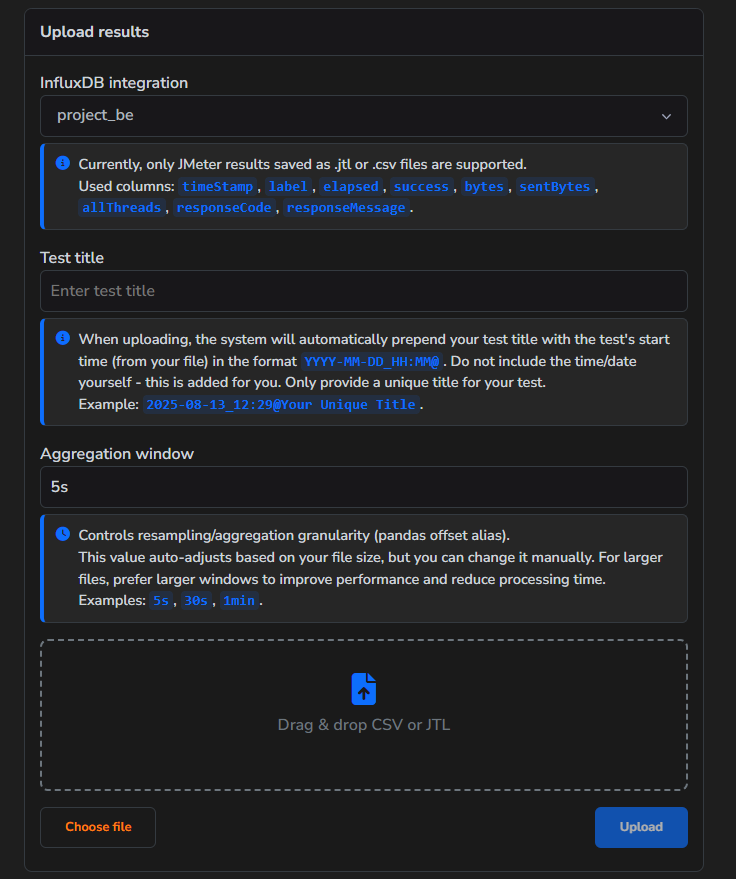
- Open the "Upload" tab.
- Choose desired Influxdb integration from the dropdown list.
- Specify "Test title" for the test, note it should be unique.
- Specify "Aggregation window" for the test.
- Upload your .jtl or .csv file, make sure that it containes necessaty columns.
- Click "Upload" button.
Data Verification
After uploading the results, they will be visible in the Tests tab.